
Cash on delivery and receipts at the desk: call, confirm, and never mix confirming with money
A cash-on-delivery order needs a call to check the address and quantity before the parcel leaves; an order paid by CCP or BaridiMob receipt waits for money to arrive. The desk puts them in two lanes with tools of their own, but it neither accepts nor refuses money. This lesson says precisely what each button does, when an order turns “Confirmed” or “Paid”, how to spot numbers that already sent parcels back, and how to switch off cash on delivery in a wilaya that returns a lot. Our example: Samir, a calligrapher selling ink sets by cash on delivery and a few orders by CCP.
- About 10 minutes to set up, then a few minutes a day
- 6 steps
Who can do it: Cash-on-delivery orders and receipts are seen with “Orders and delivery” or “Approve payments”. Marks on numbers and prepaid only by wilaya are changed with “Orders and delivery”, “Approve payments” or “Manage offers and prices”.
 Let Noqta show you
In 6 steps
- 1Cash on delivery and receipts are two lanes of the desk, and each order has an “Order” block in its panel: amount, state, quantity, delivery.
- 2“Order confirmed” means only that address and quantity were confirmed by phone; the parcel and the money have their own path.
- 3A receipt is reviewed and accepted in payments; the desk takes you there with “Review the receipt”.
- 4“Call before shipping” marks a number that already sent parcels back, or was wrong, or duplicated; your decision: always call, prepaid only, or trusted.
Before you start
- A published showcase that accepts cash on delivery or receipts, and at least one order that came through it.
- Know where your parcels ship and where “delivered” is recorded on your side: that is where the order turns paid.
- The lesson “The follow-up desk” in mind: the round and the “Log a try” sheet.
- Step 1 of 6
The two lanes and the “Order” block
Each cash-on-delivery or receipt order carries its chip, with its state and phone confirmation in the “Order” block.
- Which orders?Cash on delivery and CCP or BaridiMob receipts from your showcases. Not card, not Chargily.
- In “Order”The amount and its state, the “Quantity” if above one, and the “Delivery”: the phone-confirmation state.
- Which currency?The amount shows in dinars only; an order in another currency shows no amount.
TipThe amount shows in dinars only; an order in another currency shows no amount in this block.
All the details
A cash-on-delivery order carries the chip “Cash on delivery”, a transfer order “CCP receipt” or “BaridiMob receipt”; when the desk holds more than one type, the type bar shows “Cash on delivery” and “Receipts”. Open a person’s panel for an order: the “Order” block gives the amount and its state (“Waiting”, “Receipt to review”, “Paid”, “Rejected” or “Cancelled”), the “Quantity” if above one, and the “Delivery”, which is the phone-confirmation state: “Not confirmed yet”, “Confirmed by phone”, “No answer”, “Postponed” or “Refused”. The “Open in payments” button takes you to the ledger filtered on the order’s state. Only orders from your showcases paid by cash on delivery, CCP or BaridiMob reach the desk; card and Chargily do not.
On screenCash on deliveryCCP receiptBaridiMob receiptReceiptsOrderQuantityDeliveryNot confirmed yetConfirmed by phoneOpen in payments - Step 2 of 6
Call and confirm: what does “Confirmed” mean?
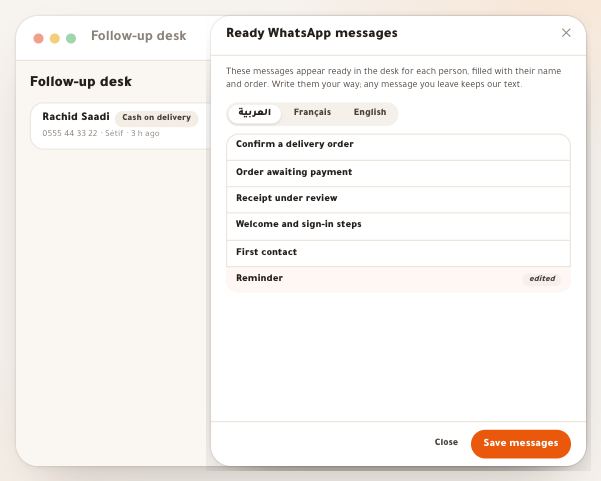
You call the buyer, check the address and quantity, and the delivery becomes “Confirmed by phone”.
- What does “Confirmed” mean?One thing: the delivery is “Confirmed by phone”. The parcel isn’t shipped because of it, and no money arrives.
- When is it paid?When the courier records “delivered”, the order turns “Paid” on its own. Until then, don’t count it as collected.
- The other outcomesAppointment or “Interested” → “Postponed”, “Cancels the order” → “Refused”, nine unanswered calls → “No answer”.
All the details
Call the buyer, check the address and quantity; if you like, the ready “Confirm the order” message reminds them of what they ordered, the order number and the delivery place. Then log the try: with “They answered”, choose “Order confirmed”. It means one thing: the delivery becomes “Confirmed by phone”, and the row reads “Confirmed”. The parcel is not shipped because of it and no money arrives: the parcel goes along its own path in orders, in the state “Waiting”, and when the courier records “delivered”, the order turns “Paid” on its own and its row locks (“The order is paid.”). The other outcomes also write to the delivery: “Appointment to call back” or “Interested” → “Postponed”, “Cancels the order” → “Refused” with the row closed, nine calls with no answer → “No answer”. This is written only while the delivery is “Waiting”, and for someone with “Orders and delivery”. A cancelled or rejected order closes by itself, with the reason “Order cancelled”.
On screenConfirm the orderThey answeredOrder confirmedAppointment to call backCancels the orderPostponedRefusedNo answerHeads-up“Confirmed” does not mean the money arrived: do not count the order as collected before it is “Paid” in payments.
- Step 3 of 6
The receipt: the desk takes you there, payments decides
The desk helps you get the receipt in, then takes you to “Incoming”, where you accept or reject it.
- Before the receiptThe row stays in “Now” so you call and help; the ready “Payment and receipt” message explains.
- After the receipt“Receipt to review”, and “Review the receipt” opens “Incoming”, where the receipt waits.
- No “Confirmed” hereThe row turns “Paid” on its own when the receipt is accepted, and closes if the order is rejected or cancelled.
TipHow a receipt is accepted is in the “Incoming” lesson: approval happens there, not at the follow-up desk.
All the details
Whoever picks CCP or BaridiMob transfers the amount then uploads the receipt photo. Until they upload it, their row stays in “Now” so you call and help them (the ready “Payment and receipt” message explains it). Once uploaded, the state becomes “Receipt to review”, the row leaves “Now” and says “Receipt waiting for your review”, with a “Review the receipt” button that opens “Incoming”, where the receipt waits under “Receipts to check” and you accept or reject it. At the desk itself there is no “Order confirmed” for a receipt: the outcomes of its call are only “Interested, thinking”, “Appointment to call back” or “Cancels the order”, and “Paid” does not appear in “Change status”; the row turns “Paid” on its own when the receipt is accepted, and closes when the order is rejected or cancelled.
On screenPayment and receiptReceipt to reviewReceipt waiting for your reviewReview the receiptIncomingReceipts to checkInterested, thinkingAppointment to call backCancels the orderPaid - Step 4 of 6
Marks on numbers and your decision
The workspace remembers each number and warns you before shipping, without refusing any order.
- When is it marked?Two returned parcels, a wrong number noted or a duplicate order: “Call before shipping”. Orders are still accepted.
- Your decision“By its record”, “Always call”, “Prepaid only”, or “Trusted”, which removes the mark.
- Who sees it?Nobody outside your workspace, and the number is kept encrypted.
Tip“Trusted” for a customer who slipped once and then proved serious: the mark disappears and the past no longer counts.
All the details
The workspace remembers what happened with each phone number. A number with two returned parcels, a wrong number noted, or a duplicate order carries the mark “Call before shipping” beside its number in the row and panel. Its orders are always accepted: the mark is a reason to call, not a refusal. Open the “This number” block in the panel: the counters (“Returned parcels”, “Wrong number”, “Duplicate orders”) or “Nothing is recorded on this number in your workspace.”, then “Your decision for this number”: “By its record” (only the rule applies), “Always call” (the mark on all its orders, even with no record), “Prepaid only” (cash on delivery is no longer offered to it on a new order; paying in advance stays available) or “Trusted” (returns ignored, no mark). With “Reason (optional, only for you)” then “Save”. Nobody outside your workspace sees any of it, and the number is kept encrypted. Someone without the permission sees the decision but cannot change it. A “Wrong number” logged on a call counts against the number; “Not on WhatsApp” does not.
On screenCall before shippingThis numberReturned parcelsWrong numberDuplicate ordersYour decision for this numberBy its recordAlways callPrepaid onlyTrustedReason (optional, only for you)Save - Step 5 of 6
Prepaid only in high-return wilayas
You turn off cash on delivery in a wilaya with too many returns, so its buyers pay in advance.
- When is it allowed?From 20 finished parcels and a return rate of 30% or more, computed from your own parcels.
- What the buyer seesCash on delivery is no longer offered; paying in advance stays.
- For how long?The wilaya stays off until you turn it back on, even if the rate improves.
All the details
The “Cash on delivery by wilaya” button at the top of the desk opens “Prepaid only in high-return wilayas”. It lists your wilayas that have parcels, each with “Finished” (delivered or returned), “Returned” and “Return rate”, computed from your own parcels. You can turn off cash on delivery in a wilaya once its finished parcels reach at least 20 and its return rate 30% or more; before that the line says “Needs 20 finished parcels and 30%” and there is no switch. When you switch “Prepaid only” on for a wilaya, its buyers are no longer offered cash on delivery, and paying in advance stays. Switching off is always possible. Changing it is for “Orders and delivery”, “Approve payments” or “Manage offers and prices”; others read the list.
On screenCash on delivery by wilayaPrepaid only in high-return wilayasFinishedReturnedReturn ratePrepaid onlyHeads-upA wilaya where you turned cash on delivery off stays off until you turn it back on, even if the rate improves.
- Step 6 of 6
“Call hours”: an honest promise to the buyer
You promise the buyer a window when you really call, and they read it on their order page.
- How to set them?“From” and “To” by the half hour, Algiers time, at least an hour in the same day.
- What the buyer reads“We call between 9:00 and 21:00, Algiers time.”, under “we will call to confirm”.
- For whom?The whole workspace; anyone who opens the desk can change them. With no hours, no time is promised.
TipAnyone who opens the desk can change them, and they apply to the whole workspace, not just you.
All the details
The “Call hours” button sits at the top of the desk (beside the “Paid → signed in” card when it shows), and once set it carries the range on the button itself. The sheet has you pick “From” and “To” (every half hour, Algiers time, at least an hour in the same day) and shows “What the buyer reads”: “We call between 9:00 and 21:00, Algiers time.” Then “Save”, or “Remove the hours” to go back to no promise. This line shows to someone who ordered cash on delivery, on their order page, under “we will call to confirm”. With no hours, no time is promised. Set the hours you really call.
On screenCall hoursFromToWhat the buyer readsSaveRemove the hours
After setting up
Questions
Does “Order confirmed” ship the parcel or record the money?
No. It only records that the delivery is “Confirmed by phone”. The parcel goes along its path, and the money is recorded when the order turns “Paid”.
Why is there no “Order confirmed” for a receipt?
Because a receipt converts only when it is accepted in payments. The desk neither accepts nor refuses.
Can I refuse an order marked “Call before shipping”?
The mark refuses nothing: the order is accepted, and it reminds you to call before shipping. The decision is yours after the call.
What does “Prepaid only” do for a number?
On any new order from that number, cash on delivery is not offered; paying in advance stays available.
Why is there no switch for a wilaya?
Because it has not reached 20 finished parcels and 30% returned from your parcels, or because you lack the permission to change.
Does another teacher see what I noted on a number?
No. Marks belong to your workspace, and the number is kept encrypted with it.
Where is the delivery state shown in “Order” written?
“Order confirmed”, “Appointment” and “Cancels the order” write it from the desk, while the delivery is “Waiting” and you have “Orders and delivery”. The rest of the parcel’s path is followed in the shipping screen.