
Set the delivery fee of each wilaya before you sell a parcel
A photographer in Oran sells framed prints, a fitness coach a workbook, a calligrapher a pen set: all of them ship parcels, and buyers hate finding the delivery price at the door. You set one table: for each wilaya a “To the door” price and a “Pickup desk” price, which buyers see on the product page and in their order before confirming.
- About 8 minutes
- 6 steps
Who can do it: The page needs the “Store and products” permission, which the owner and manager have. The table works for every workspace.
In 6 steps
- 1Open “Delivery” in the “Store” section, then “Prices by wilaya” → “Templates and bulk actions”: that is the table itself, with all its tools.
- 2Start from “Start from suggested values”, “One price for every wilaya” or “Start empty”, and pick “Where do you ship from?”.
- 3Set each wilaya: the switch, the “To the door” and “Pickup desk” prices from 0 to 20,000 DZD, and a note for you alone.
- 4Use “Quick actions”: +50 DZD, −50 DZD, no South, no desk. Then “Undo” or “Save”.
Before you start
- A physical product you sell, from a showcase or the store.
- The contract or prices of the courier you use (Yalidine, ZR Express, Maystro…): the suggested values are only indicative.
- The wilaya you ship from, because the suggested prices rise with distance.
- The “Store and products” permission in your role.
- Step 1 of 6
Where to find delivery fees
One table tells buyers the delivery price to their wilaya before they confirm, so nothing surprises them at the door.
- Where?“Store” → “Delivery” → “Prices by wilaya”, then “Templates and bulk actions”.
- What the card saysThe buyer’s own sentence, such as “Delivery to 52 wilayas · from 250 DZD”.
- Store closed?Your showcases still sell: the order goes through the product’s own page. Don’t put the table off.
Tip“Your store is closed, and your showcases still sell: the order goes through the product's own page.” So don't put the table off because the store is closed.
All the details
The table is in “Store” → “Delivery” → “Prices by wilaya”, and the “Templates and bulk actions” link opens it with all its tools. The “Store” page may also show a “Delivery fees” card that says in one sentence what buyers read, such as “Delivery to 52 wilayas · from 250 DZD” or “Delivery to 40 wilayas · free in some”, with an “Edit” button. Before any table it says: “Not set yet: buyers don't see delivery before ordering.”, button “Set them now”. The page itself is called “Delivery fees”: “What a buyer pays to get the product to their wilaya. They see it in the order form before confirming.” Without permission to edit, you can only view the table.
On screenStoreDelivery feesSet them nowEdit - Step 2 of 6
Start from suggested values
Don’t start from a blank page: pick your wilaya and a ready ladder, then adjust what you need.
- Where do you ship from?Your settings’ wilaya or Algiers, then “Moderate ladder”, “Economy ladder”, “My wilaya only” or “One price”.
- Six distance bandsFrom “Your wilaya” to “Deep south”, each with a door and desk price: 450 DZD and 300 DZD at home on the moderate ladder.
- An official tariff?No, not any courier’s: compare with your contract. “Use these values” fills the table without saving it.
Tip“My wilaya only” is for those who deliver themselves: 300 DZD to the door in your wilaya, no desk, everything else paused.
All the details
With no table, the page opens on “Set your delivery fees once” and three buttons: “Start from suggested values”, “One price for every wilaya” and “Start empty”. The first two open the “Suggested values” window, with the badge “Suggested values, edit them”. Pick “Where do you ship from?” (the wilaya in your settings by default, otherwise Algiers), then a ladder: “Moderate ladder”, “Economy ladder”, “My wilaya only” or “One price”. Below, six distance bands: “Your wilaya”, “Neighbours”, “Near”, “Far north and plateaus”, “South” and “Deep south”, each with its number of wilayas and its door and desk prices, which you can edit. The “Moderate ladder” gives for example 450 DZD to the door and 300 DZD at a pickup desk in your wilaya, up to 1,200 DZD and 750 DZD in the deep south. “Use these values” (or “Apply to all 69 wilayas” for the single price) fills the table without saving it.
On screenStart from suggested valuesOne price for every wilayaStart emptySuggested valuesWhere do you ship from?Moderate ladderEconomy ladderMy wilaya onlyOne priceUse these valuesApply to all 69 wilayasHeads-upThe window says it: “They are no courier's official tariff: compare with your contract (Yalidine, ZR Express, Maystro…) and adjust here or later.” And if the table already has prices: “They replace the table's current prices; you can undo before saving.”
- Step 3 of 6
The 69 wilayas
For each of the 69 wilayas, a door price and a pickup desk price, or no delivery there.
- Empty or zero?Empty = not offered, 0 = free. A price runs from 0 to 20,000 DZD.
- When is it served?Its switch is on and it has at least one price. The note is only for you; buyers never see it.
- One pricePer wilaya and mode, whatever the product: no price by weight, size or commune.
TipIn a field, Enter moves to the next one, Escape restores the value, and Arabic-Indic digits and spaces are accepted.
All the details
The table is split into “Centre”, “East”, “West”, “High Plateaus” and “South”, each saying for instance “5 of 8 served”. Every wilaya has a row: the “Delivery to …” switch, its number and name, the “To the door” and “Pickup desk” fields in dinars, and a “Note” pencil. A price runs from 0 to 20,000 DZD: empty = not offered, 0 = free. A wilaya is served when its switch is on and it has at least one price; typing a price into a paused row turns it on, and a row that is on with no price says “Enter a door or desk price”. The note is up to 120 characters, “Only for you, buyers never see it.” (for example “e.g. the desk is downtown”). Above, the search “Find a wilaya by name or number” understands “bejaia”, “بجايه” and “16”, and the filters “All”, “Served” and “Paused” show their counts. Each region has “Serve all” and “Pause all”.
On screenCentreEastWestHigh PlateausSouthTo the doorPickup deskFind a wilaya by name or numberAllServedPausedServe allPause allNoteEmpty = not offered · 0 = freeA number from 0 to 20,000Heads-upThe price is one per wilaya and mode, whatever the product: no price by weight, size or commune.
- Step 4 of 6
Quick actions, undo, then save
Change the whole table in one tap and undo if needed; nothing is saved until you press “Save”.
- Quick actions“+50 DZD everywhere”, “−50 DZD everywhere”, “No delivery to the South” (twenty wilayas paused, prices kept) and “No delivery desk”.
- A draft until savedChanged rows are tinted and counted at the bottom, with “Discard changes” and “Save” (Ctrl/⌘+S).
- “Clear the table”Two presses, and the saved table is cleared at once. Nothing comes back.
All the details
In “Quick actions”: “+50 DZD everywhere” and “−50 DZD everywhere” (they move every price of the served wilayas, never below 0), “No delivery to the South” (pauses the twenty wilayas of the South development programme, Adrar to Tamanrasset, and keeps their prices), “No delivery desk” (removes the desk price everywhere, keeps the door price) and “Suggested values”. After each action, a message such as “+50 DZD on 52 wilayas.” with “Undo”. Everything stays a draft: changed rows are tinted and the bar at the bottom says “Unsaved changes: 3” with “Discard changes” and “Save” (or Ctrl/⌘+S). Only changed rows are sent, then “Table saved”. “Clear the table” takes two presses (“Tap again to clear”) and clears the saved table at once.
On screenQuick actions+50 DZD everywhere−50 DZD everywhereNo delivery to the SouthNo delivery deskSuggested valuesUndoDiscard changesSaveTable savedClear the tableHeads-up“Check the marked prices: a number from 0 to 20,000.” blocks saving until the red field is fixed. And after “Clear the table”, nothing comes back.
- Step 5 of 6
What the buyer sees
See what the buyer will read before you save, and try any wilaya the way they will.
- The buyer cardThe product page’s sentence, and how many wilayas are served to the door, at a desk and in the South.
- Try a wilaya“Try it as a buyer”: “To the door 600 DZD · Pickup desk 400 DZD”, or “No delivery to … at the moment”.
- In their orderWilayas not served are greyed out; once theirs is picked, two cards, “To your door” and “Pickup desk”, with their price.
TipOn a phone the buyer card comes first, and “Try it as a buyer” stays folded until you open it.
All the details
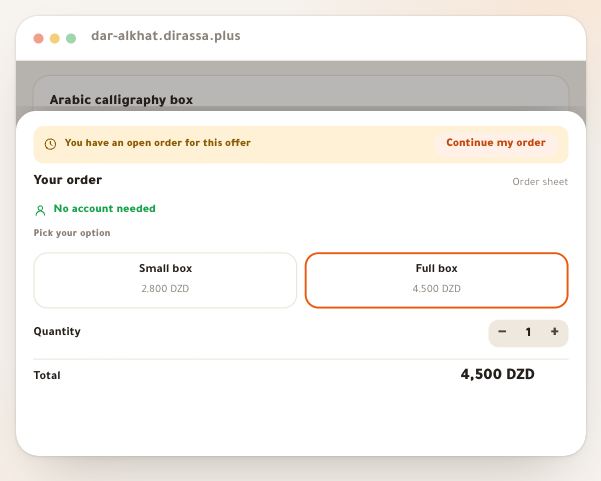
Beside the table, the “What the buyer sees” card (which becomes “What the buyer will see once saved” while there are edits) shows the sentence of the product page, and under it “To the door: 52 wilayas”, “Pickup desk: 38 wilayas” and “South: 7 of 20”. With “Try it as a buyer” you pick a wilaya and read “To the door 600 DZD · Pickup desk 400 DZD”, or “No delivery to … at the moment”. At the visitor's side: on the product page “Delivery to 52 wilayas · from 250 DZD”; in their order (the page's form, or the showcases’ order sheet) the wilaya list greys out those not served with “— We don't deliver to this wilaya yet”; once their wilaya is picked, two cards “To your door” and “Pickup desk” with their price, “Free” or “Not available in your wilaya”, and if only one mode is served it is picked for them. The total carries a line “Delivery · Algiers · To your door”, and under the form “We call you to confirm before shipping”.
On screenWhat the buyer seesWhat the buyer will see once savedTry it as a buyerPick a wilayaWe don't deliver to this wilaya yetNot available in your wilayaDeliveryWe call you to confirm before shipping - Step 6 of 6
What the table covers, and what it doesn't
The table prices parcels in the product page’s order form and in the showcase’s order sheet; the server confirms the price at the order.
- No table?The order sheet refuses parcel orders, and “Cash on delivery” is not ready in the offer. Set it before you publish.
- Price changed?If it changes between opening and confirming, the buyer reads “The amount is now …”.
- The activation cardIt never reads this table: its fixed price is “Card delivery fee (DZD)”, in the payment settings.
All the details
The table prices parcels in the order form of the product page and in the showcase's order sheet. With no table, the server refuses a parcel order from the sheet and the buyer reads “Delivery isn't set up yet. Contact the seller.”, with no payment method listed; in the offer form “Cash on delivery” shows as not ready with “Add the per-wilaya delivery table first.” and a link to this page. A wilaya you don't serve says “We don't deliver to this wilaya yet.”, a mode you don't serve “This delivery option isn't offered in your wilaya.” At the order the server confirms the price: if it changed between opening and confirming, the buyer reads “The amount is now …”. As for the delivered activation card, it never reads this table: it has one flat price, “Card delivery fee (DZD)”, in the payment settings.
On screenDelivery isn't set up yet. Contact the seller.Add the per-wilaya delivery table first.We don't deliver to this wilaya yet.This delivery option isn't offered in your wilaya.Heads-upThe empty screen says “Product sales pages can't be published before this table.” We found no publishing check that really enforces it: set the table before you publish, so no visitor reaches an order that gets refused.
Once the table is set
- Know the delivered cardIts flat price and parcel states don't go through this table.
- Know the order sheetWhat the buyer fills and sees after confirming.
- Call the buyerEvery parcel order is confirmed by phone before shipping.
- Follow the ordersIn “Incoming”, follow each parcel: to ship, cash with the courier, back to you.
Questions
What is the difference between empty and zero?
An empty field means that mode is not offered in the wilaya; zero means free delivery. If both fields of a wilaya are empty, it is no longer served.
Do I have to serve every wilaya?
No. Pause the ones you don't reach with the switch or “No delivery to the South”: buyers see them greyed out in their list.
Are the suggested values my courier's tariff?
No. They are indicative prices for a small parcel, rising with distance from your wilaya, not any courier's official tariff: compare with your contract.
Do buyers see my notes?
No. “Only for you, buyers never see it.”
Can I price by weight or by product?
No. Each wilaya has one door price and one desk price, for every product.
When does a visitor see the new price?
On their next visit to the page after you save.
What happens if I clear the table?
Delivery prices disappear from pages, and a parcel order is refused in the showcase's order sheet with “Delivery isn't set up yet.”, until you set a new table.
Does the table apply to the activation card's cash on delivery?
No. The activation card has its “Card delivery fee (DZD)” in the payment settings, one price for every wilaya.