
All parts
School and team
Your multi-teacher school: team, rules and review, contracts and money, and what students see.
Getting started3 lessons
- Open your school“School” turns your workspace from one teacher selling alone into a school where many teachers sell under one name. Each teacher has their own courses, students, contract and monthly statement; the director decides what gets published and sold. Switching it on is a five-step setup, and nothing is saved before the last click. In this lesson Mourad Belkacem switches on “Al Ofok Academy” before inviting his three teachers: Samia Ben Amor (physics), Karim Haddad (maths) and Nadia Meziani (Arabic). The same steps serve a photography trainer bringing other trainers in, or a training centre organised in departments.9 steps · 10 minutes
- Home: your school at a glance“Home” is what the school director opens every morning: first what waits for their decision, then the month’s numbers, then the teachers and how fast they answer students, then what’s worrying. Nothing is edited in place: every line is a door to its page. In this lesson Mourad Belkacem reads the home of “Al Ofok Academy” on Friday 9 October in the morning: three decisions, 190 500 DZD of sales, and two of Nadia’s students’ questions past the deadline.9 steps · 6 minutes
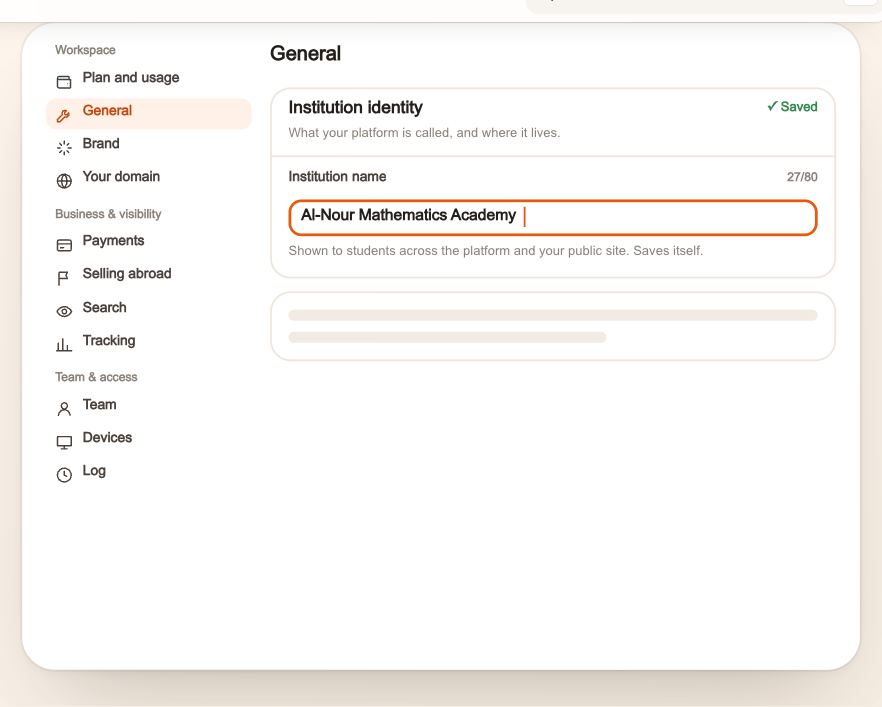
- Your school’s settingsYour school’s name, the address your students open, its color and logo, its app on their phones, how it looks in search and when shared, and what it reports to ad networks: it all lives in “Settings”, and it all saves on its own. Every section is explained here, with what changes for your students after each choice, on a real school: “Al-Nour Mathematics Academy”.7 steps · 10 minutes
The team4 lessons
- Invitations and applicationsEveryone who joins your school’s team comes in through one door: an invitation carrying their role, department and contract; they open it, read what was agreed, then accept. Here is the whole way, from both sides, at “Al Ofok Academy”: Mourad Belkacem invites Karim Haddad as a maths teacher on a monthly salary, Yacine Mansouri as Samia Benamor’s assistant, and takes Nadia Meziani’s application from “Teach with us”.10 steps · 5 minutes per invitation
- Your teachersThe “Teachers” page gives a line to everyone who teaches in your school: who they are, on which contract, what they sold this month, what’s left for the school, and how fast they answer their students. Each line opens the teacher’s page: their courses, six months of sales, what waits for your decision, their contract and statements, and the quality of their follow-up. In this lesson Mourad Belkacem reads the three teachers of “Al Ofok Academy” in October, searches for the physics teacher, then opens Samia Ben Amor’s page.10 steps · 8 minutes
- Staff, departments and ending collaborationWho helps you, what they work on, who reviews what: it is all in “Staff and departments”. And when someone leaves, you choose between suspending, removing and ending the collaboration, each with what stays and what changes. At “Al Ofok Academy”: Yacine Mansouri assists Samia Benamor, two departments for science and languages, then Nadia Meziani leaves and comes back.10 steps · 10 minutes
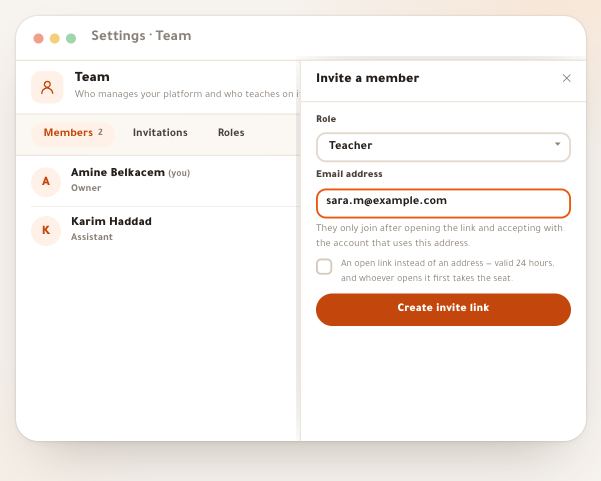
- Your team and its permissionsYour school is more than one person: teachers who sell their courses under its name, an assistant who answers their teacher’s students, a supervisor who reviews a department, an accountant who records payments. You invite each by a link, give them a role that says what they do, and a reach that says where: the whole school, their department, or their own work. It all happens in “School”, under “Team”. Our example: Amine Belkacem, director of En-Nadjah Academy, invites Sara Makhloufi as a teacher, then Karim Haddad as her assistant.5 steps · 7 minutes
Rules and review3 lessons
- School rulesThe rules are the written agreement between you and your team: who publishes a course, which range a price sits in, how much a teacher can discount alone, what the school takes and when it pays. You don't start from a blank page: every rule is a choice with a ready value, and every choice becomes a sentence the teacher reads. You edit in a draft nobody else sees, then publish a new version: every member gets a notice to read and accept it. In this lesson Mourad Belkacem, director of Al Ofok Academy, raises the minimum payout and lowers the no-approval discount to 20%, publishes version 3, then follows who accepted it among Samia, Karim, Nadia and Yacine.10 steps · 10 minutes
- Reviews and requestsThe school rules set the limits; “Reviews and requests” is where whatever must pass through you arrives: a new course reviewed before students see it, a price outside the range, a discount above the limit, more storage, an assistant seat. Each request has 48 hours, one decision with a written reason, and an effect you read before you press. In this lesson Mourad Belkacem reviews “Physics: electricity” sent by Samia Benamor, decides on a price Karim Haddad asked for and a discount Nadia Meziani asked for, then we see how Nadia sends her request and follows it.9 steps · 9 minutes
- Quality and the logThe “Quality and reports” page gives your teachers no score and no ranking: it says what students live through with each one — how long they wait for a reply, how many papers wait to be graded, a live cancelled or late, low ratings, a course whose lessons stopped — and puts the fix next to each signal. The “Log” writes every change in the school as a sentence, with who and when, and is never edited or deleted. In this lesson Mourad Belkacem sees at Al Ofok Academy that questions from Karim Haddad’s students are past the deadline, assigns them to the assistant Yacine Mansouri, then finds the assignment in the log. The same page serves a training centre following its trainers, or a design and editing academy.8 steps · 5 minutes a week
Money4 lessons
- Contracts and commissionsEvery sale in your school is split the moment it happens, by its teacher's contract: the teacher's share and the school's. The contract says how: a percent of each sale, a salary, a fee the teacher pays, or a mix, with a tier, a link and sessions. And a contract is never edited in place: each change is a new version with a start date, and a month already lived keeps its contract. In this lesson Mourad Belkacem, director of Al Ofok Academy, writes the contracts of his three teachers: Samia Benamor (physics, commission), Karim Haddad (maths, salary) and Nadia Meziani (Arabic, fee + commission), and tries a lower commission for Samia on her past months before saving it.10 steps · 10 minutes
- Money and the all-access subscription“Earnings” takes one month, from what students paid to what stays with the school, and every number adds up: sales = school's share + owed to teachers. Rules settle the hard cases underneath: who bears a refund, who bears a discount code, what happens to a code with no price or to a course that changes hands mid-month. And in “Contracts and commissions” sits the “All-access subscription” block: one monthly subscription that opens the school's courses, part of which is shared among teachers by what subscribers watched. In this lesson Mourad Belkacem reads Al Ofok Academy's numbers for September 2026, then launches its all-access subscription.9 steps · 9 minutes
- Statements and payoutsEvery teacher in your school has a monthly statement, worked out on its own from their sales and their contract. Your part is three moves: close the statement when the month is over (it gets a number and freezes), pay and record the payment, then the teacher confirms with one tap that the money arrived. In this lesson Mourad Belkacem closes September’s statements at Al Ofok Academy: Samia Benamor on 70%, Karim Haddad on a monthly salary and Nadia Meziani on subscription plus commission, then pays and answers a dispute. The same page serves a training centre paying its trainers, or a studio paying its photographers and video editors.10 steps · 10 minutes a month
- School StudioIn a school, many teachers work in Dirassa Studio, and the coins come out of one balance. While it is shared, one very active teacher can empty it before their colleagues even start. “School Studio” gives each teacher their own pocket: they spend only from it, and you fill it with a lump sum, a monthly allowance or by approving their request. In this lesson Mourad Belkacem shares 600 coins among Al Ofok Academy's teachers: Samia Benomar, who makes booklets and motion explainers every week, Karim Haddad and Nadia Meziani. The same method serves a photography school whose trainers make promo videos, or a training centre producing booklets.10 steps · 6 minutes
For the teacher2 lessons
- My school: your work inside the schoolWhen you join a school on Dirassa+ as a teacher, you get your own corner of it, “My school”: what waits for you today, your courses, your contract, your personal link, and everything you send to the management. In this guide Samia Benamar, a physics teacher at Al Ofok Academy, starts from her first sign-in: she accepts the rules, writes her public page, creates her link, sends her first course for review, asks for a discount and invites her assistant Yacine Mansouri. The same steps hold for a video-editing trainer or a photographer teaching at an academy.10 steps · ≈ 10 minutes
- My contract and earningsEverything about your money in the school sits on one page: “My contract and earnings”. You watch the month’s statement build sale by sale, your contract with every version, and the closed statements with their payments; you confirm what arrived with “I received it”, and dispute a line you think is wrong. In this guide Samia Benamar, a physics teacher on 70% at Al Ofok Academy, follows October, reads September’s statement line by line and confirms a CCP transfer. And last: what stays yours if the work ends.9 steps · ≈ 8 minutes