All parts
Students
Enroll students and follow their progress.
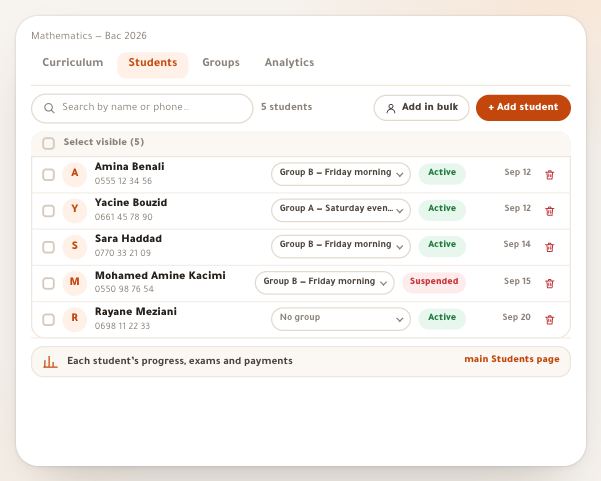
- Course students and groupsEvery course has its own student list and groups. Here you enroll one student or a whole class, generate codes for those without an account, split them into groups with start dates, and suspend anyone’s access. Every button of both tabs is explained, with examples from a real course.6 steps · 8 minutes
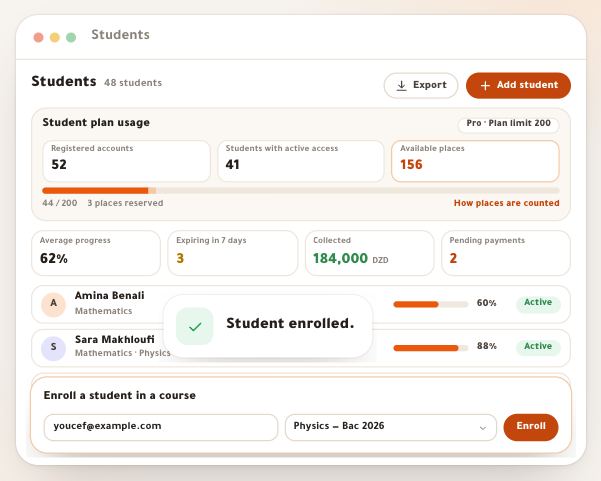
- The students directoryThe Students page gathers every student in your school, from every course, in one table, under a card that tells you how many places are left in your plan and who needs a follow-up now. From it you add students, search, filter and export, and you open any student in a popup to message them, extend their subscription, move them or suspend their account. Every button is explained here, along with what a student sees when they join you.9 steps · 9 minutes
- Student reviewsWhat your students say sells better than what you say, as long as it’s honest about where it came from. “Student reviews” keeps it in three kinds that never mix: reviews your students wrote from their own accounts after you asked, screenshots of what they said on WhatsApp or Facebook with their permission, and their notes on lessons. Add something once and it shows on your page and on every page selling your course. In this lesson Samia Benomar asks the students of “Baccalaureate physics” for reviews, publishes Amina’s and replies to it, and adds a thank-you from Ishak’s mother on WhatsApp; then Mourad Belkacem, director of Al Ofok Academy, goes through Karim Haddad’s students’ reviews.10 steps · 6 minutes